Point the camera
The frame finds the edges of the receipt and captures when it is steady. Two taps from the home screen, one from the lock screen widget.
For 1099 workers and small businesses. iPhone. Coming soon.
Photograph it. Your iPhone reads the total, the date, the merchant, the sales tax and the tip without sending the photo anywhere. You check what it read, tap save, and it files under the write-off line you are going to copy it into. A quarter of paper becomes a report in an afternoon instead of a weekend.
79.99 a year or 12.99 a week. No free trial. You will see that number before you see anything else, which is more than most of this category manages.
Harbor Supply Co.
Three taps
The work is not photographing the paper. The work is typing it into a spreadsheet at tax time, and that is the part this removes. The target here is to be easy to use on an ordinary Tuesday, not impressive in a feature list.
The frame finds the edges of the receipt and captures when it is steady. Two taps from the home screen, one from the lock screen widget.
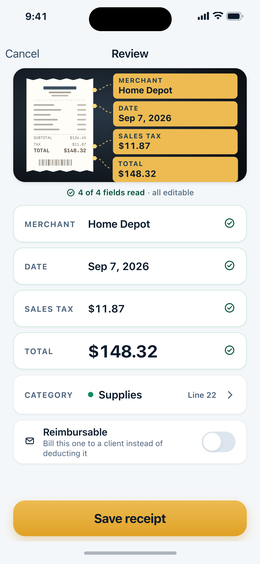
Total, date, merchant, sales tax and tip, shown next to the photograph they came from and every one of them editable. Nothing is saved until you say so.
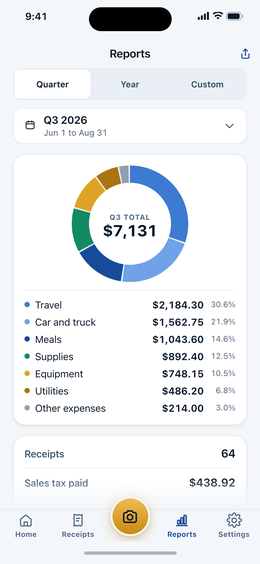
A CSV your spreadsheet opens and a PDF with the receipt images grouped by category, both carrying the Schedule C line number, split by quarter, year or any range you pick.
The app
Numbers set in tabular figures, one accent color for money, and no decoration competing with the amount you came to read.
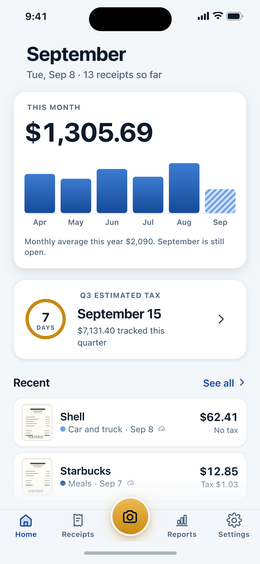
Why this one
This is not a guess about the market. It is what falls out of reading the reviews and watching the recorded walkthroughs of the apps that already lead this niche.
Every scanner misreads creased and faded paper. The difference is what happens next. Here the editable confirmation screen is the main event, and when no total is found the field is left empty and focused instead of filled with a guess.
Batch import takes the receipts already sitting in your camera roll, processes them in one pass and lines them up in a confirmation queue. A shoebox becomes a quarter in the time it takes to drink a coffee.
Not Groceries and Personal. Advertising line 8, Car and truck line 9, Contract labor line 11, Office line 18, Supplies line 22, Travel line 24a, Meals line 24b, Utilities line 25. The line number travels with the expense all the way into the export, so Part II becomes a column to read down.
Where your data is
This is not a promise about a privacy policy. It is a description of how the software is built, and you can check it by putting the phone in airplane mode and scanning a receipt anyway.
No sign-up, no password, no email address handed over before you know the price. Sync goes to your own private iCloud under your own Apple Account, so a new phone restores from your account and not from ours.
Apple's Vision framework does the reading, on your iPhone. No receipt image and no text from one is uploaded to us or to any recognition service.
Scan on a job site, in a basement, on a plane. The leading app in this category needs a live connection to read anything, and there is a one-star review that explains exactly why that hurts.
There is no Plaid connection, no transaction import and no reconciliation. Nothing here asks for your online banking credentials, because nothing here needs them.
There is no mileage tracker running in the background. Version one does paper, and a phone that lasts the working day is worth more than a feature nobody asked this app for.
Price
The single loudest complaint in this category is not that the apps cost money. It is that you find out after handing over your details. So here it is first.
Yearly
$1.53 /week
Billed as $79.99 per year. Was ~~$149.99~~.
Weekly
$12.99 /week
$675 per year if billed weekly. It is here so the yearly plan has something to stand next to.
No free trial and no auto-charge surprise. There is no seven-day countdown to forget about. You pay when you tap buy, you cancel in Settings, and Apple handles refunds at reportaproblem.apple.com.
One more thing worth saying out loud: if you are self-employed, this subscription is itself a deductible business expense. Line 18 of Schedule C, office expense, or line 27a, other expenses. Ask your tax professional which.
No newsletter, no drip sequence, no discount codes. A single message when DeductHound is on the App Store, and that is the end of it.